> For the complete documentation index, see [llms.txt](https://docs.auterion.com/llms.txt). Markdown versions of documentation pages are available by appending `.md` to page URLs; this page is available as [Markdown](https://docs.auterion.com/vehicle-operation/auterion-suite-fleet-management/mission-planning/mission-cloud-sync.md).
# Mission Cloud Sync
## Overview
**Mission Cloud Sync** allows pilots and mission planners to sync missions between **AMC (Auterion Mission Control)** and the **Auterion Suite**. Missions created on any AMC device are automatically available to all pilots in your organization through Auterion Suite.
Use Mission Cloud Sync to:
* Plan missions remotely and make them immediately available to field pilots.
* Apply standardized missions across multiple compatible vehicles.
* Allow pilots to make on-site adjustments to adapt missions to local terrain conditions.
Once a mission is uploaded to the Auterion Suite, pilots can download and execute it directly from AMC at the mission location.
## Setup
1. Download AMC and ensure the device running AMC has an active internet connection.
2. Log in to your Auterion Suite account in AMC by clicking **Log in** in the side menu.
3. In AMC, go to the **Quick menu** → **Cloud.**
4. Locate **Enable Mission Cloud Sync for missions** and confirm the toggle is enabled.
### Accessing your missions
Once Mission Cloud Sync is enabled, all missions stored in your organization's Auterion Suite are available in AMC.
1. Open the **Plan** menu in AMC.
2. Select **Missions** from the top bar.
The connection status to the Auterion Suite is shown in the top-left corner of the Missions panel. A green indicator confirms an active connection.
{% hint style="info" %}
For more on how to create mission visit [Mission Menu](https://docs.auterion.com/vehicle-operation/auterion-mission-control/ui-breakdown/plan/plan-tools/mission-menu).
{% endhint %}
While connected to the Suite, any new mission you save, or any changes to an existing mission, are automatically stored in the Auterion Suite.
### Managing Missions in Auterion Suite
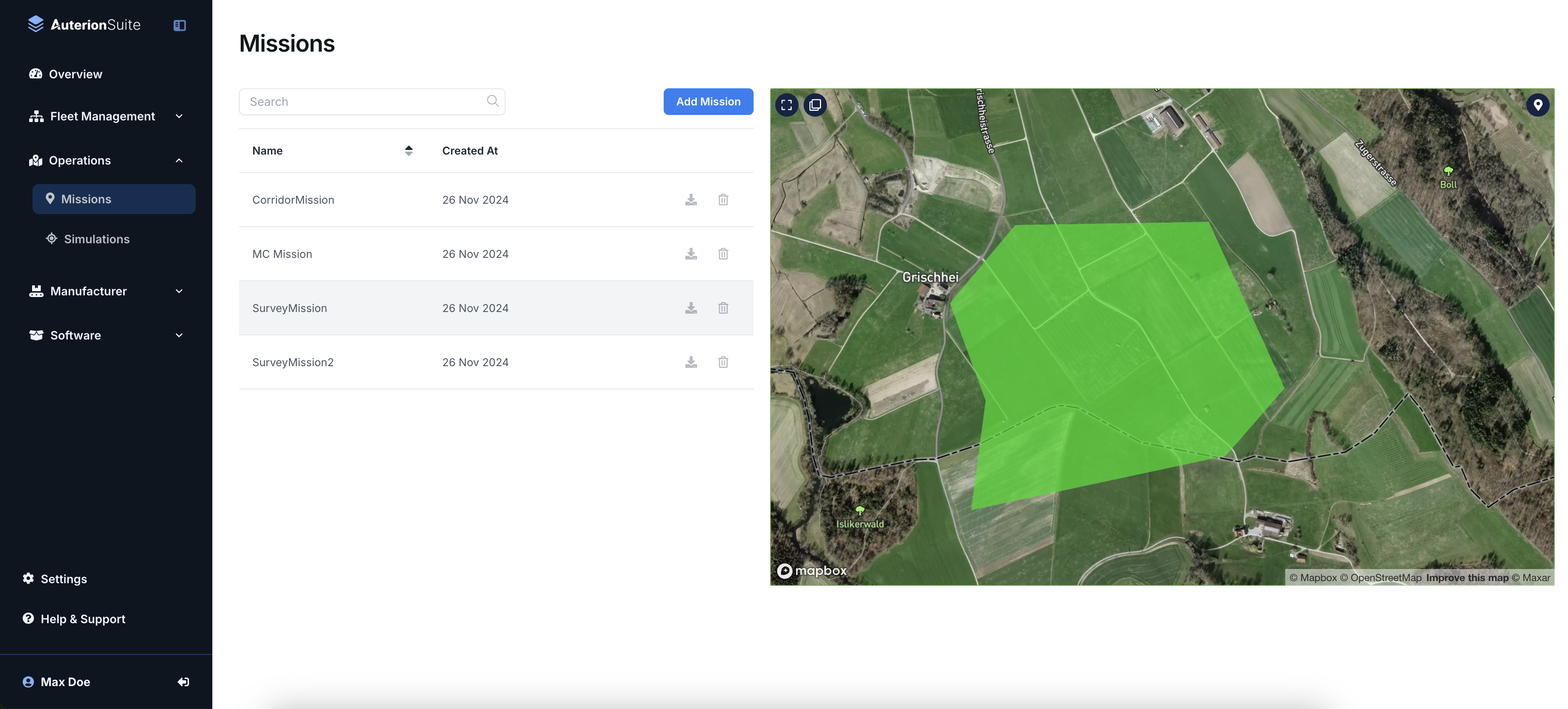
Auterion Suite is the central location for storing, organizing, and managing all missions across your fleet. To access your missions in the Suite:
1. Log in to your Auterion Suite account via a web browser.
2. Navigate to **Operations** → **Mission Synch**.
**From the Missions page you can:**
* View all missions synced from AMC in list format
* Select a mission to preview its flight path or survey area on the map
* Download or upload missions locally as `.plan` files
* Add missions directly using **Add Mission**