> For the complete documentation index, see [llms.txt](https://docs.auterion.com/llms.txt). Markdown versions of documentation pages are available by appending `.md` to page URLs; this page is available as [Markdown](https://docs.auterion.com/vehicle-operation/auterion-mission-control/useful-resources/maps-and-custom-overlays/import-custom-maps-and-terrain.md).
# Import Custom Maps and Terrain
### Importing Custom Imagery (Maps)
{% hint style="info" %}
Supported formats: **Slippy Map**
{% endhint %}
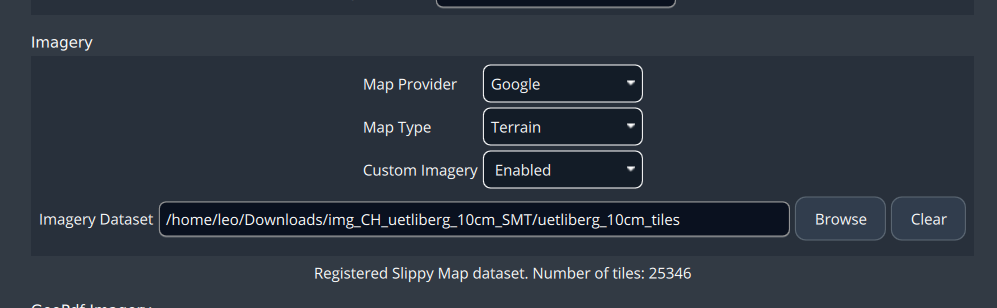
Go to **Settings** *->* **Map & Terrain** -> **Imagery** section.
In the **Custom Imagery** combo box, select **Enabled**, then click **Browse**.
This will open a file dialogue popup where you can select your imagery dataset to import.
To remove an imported dataset, click **Clear**.
### Importing Custom Elevation (Terrain)
{% hint style="info" %}
Supported formats: **DTED**, **Copernicus DEM**
{% endhint %}
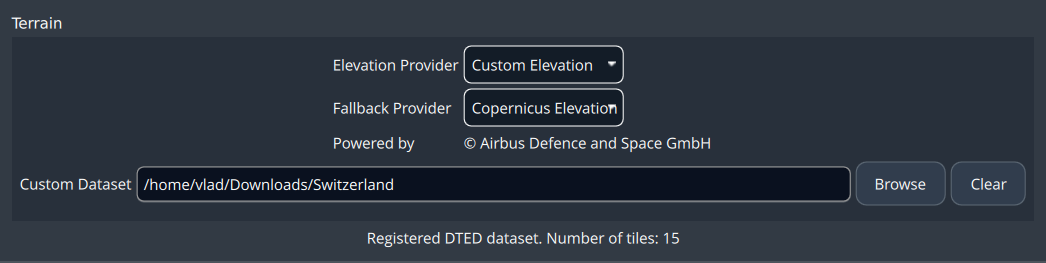
Go to **Settings** *->* **Map & Terrain** -> **Terrain** section.
In the **Custom Imagery** combo box, select **Custom Elevation**, then click **Browse**.
This will open a file dialogue popup where you can select your custom dataset to import.
To remove an imported dataset, click **Clear**.
.png?alt=media&token=c81d5f6f-526e-460c-8ed9-b4efa38b4692)