# Vehicle status indicator

![High Level Status Indicator](/files/xIMEXRBGLnXe6Z8Qmivb)

The *high level status indicator* in the top left of the application bar provides immediate and highly visible color-coded notification of vehicle readiness to fly and in-air flight state.

The indicator also displays the current vehicle being controlled and text describing the status/problem. For VTOL vehicles (only) this may also display the mode: *Fixed-wing*/*Multirotor*.

{% hint style="info" %}
If there are multiple vehicles it can be used to select between them.
{% endhint %}

The indicator states are listed below.

| **Indicator**                                                                                              | **Color** | **Description**                                                                                                                                                                                                                                                                         |
| ---------------------------------------------------------------------------------------------------------- | --------- | --------------------------------------------------------------------------------------------------------------------------------------------------------------------------------------------------------------------------------------------------------------------------------------- |
| ![](/files/w0d1mDCExfjmE0T8uNZH)                                                                           | Green     | Vehicle is ready to arm and take off.                                                                                                                                                                                                                                                   |
| <p><img src="/files/jNFFSyd1JXJlJw2Q770l" alt=""></p><p><img src="/files/EtT5v8uvApZdxb9O3Xy4" alt=""></p> | Orange    | <p>Vehicle is not ready to take off for a <em>known</em> reason:</p><ul><li>System requires setup (e.g. compass calibration).</li><li>Active warning of condition preventing takeoff (e.g. no position lock, low battery).</li></ul><p>The "reason" is displayed as indicator text.</p> |
| ![](/files/ZXFyejRryUbkKadKzpsc)                                                                           | Red       | Unknown fault preventing takeoff.                                                                                                                                                                                                                                                       |

**Top bar indicators**

| **Icon**                                                                                         | **Name**                                                                                                                              | **Description**                                                                                                                                                                                      |
| ------------------------------------------------------------------------------------------------ | ------------------------------------------------------------------------------------------------------------------------------------- | ---------------------------------------------------------------------------------------------------------------------------------------------------------------------------------------------------- |
| <img src="/files/OnGFWOYL3qd7OaxoERdt" alt="" data-size="original">                              | **Menu / icon**                                                                                                                       | App menu ([navigate ](/vehicle-operation/auterion-mission-control/navigating.md)to *Fly*, *Plan*, *Vehicle Setup, Photos*, *User Login*, *Application Settings*).                                    |
| ![](/files/w0d1mDCExfjmE0T8uNZH)![](/files/jNFFSyd1JXJlJw2Q770l)![](/files/ZXFyejRryUbkKadKzpsc) | [**High-Level Status**](/vehicle-operation/auterion-mission-control/ui-breakdown/fly/high-level-status.md) **/** **Vehicle Selector** | <p>High-level status of the current vehicle (colour and status description).<br><br>Also used to select the current vehicle.</p>                                                                     |
| <img src="/files/qeNQcE1Q3MCKUJCl8TyZ" alt="" data-size="original">                              | **Mode**                                                                                                                              | Display the current *flight mode*. Select to enable a *manual* flight mode.                                                                                                                          |
| ![](/files/eXAtZfEcUxh9qKjorchJ)                                                                 | **Connection manager**                                                                                                                | Pairing status.                                                                                                                                                                                      |
| <img src="/files/iCbKDo4a1OMG94lqiSTK" alt="" data-size="original">                              | **Armed/Disarmed State**                                                                                                              | Display/select the *armed state*. The states are **Armed** (motors spinning), **Disarmed**. (motors stopped), **Emergency Stop** (motors stopped in flight, potentially causing the drone to crash). |

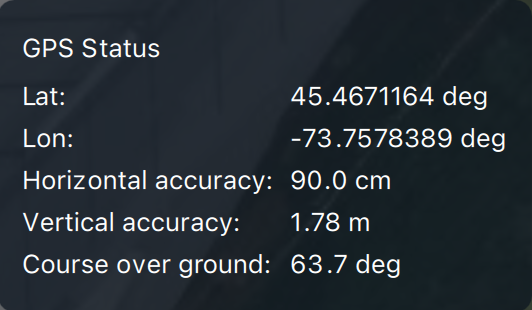
| <img src="/files/dSBRlXGuLedLXDAot2ZJ" alt="" data-size="original">                              | **GPS Status**                                                                                                                        | <p>GPS count, lock, HDOP, VDOP, Course over ground.</p><p><img src="/files/ipwZMwakN49z0LXJ0U5d" alt=""></p>                                                                                         |
| <img src="/files/Q9wG3v7Kml4dLALsk09u" alt="" data-size="original">                              | **Link Quality**                                                                                                                      | The bars represent the signal strength. The higher the count of lines the stronger the signal is.                                                                                                    |
| <img src="/files/LvCOs1RTLtkRUGC6egak" alt="" data-size="original">                              | **Cellular Indicator**                                                                                                                | Status, Signal Strength, Up and Downlink rate.<img src="/files/2Xz1dGl8wvu6xNGHLwW9" alt="" data-size="original">                                                                                    |
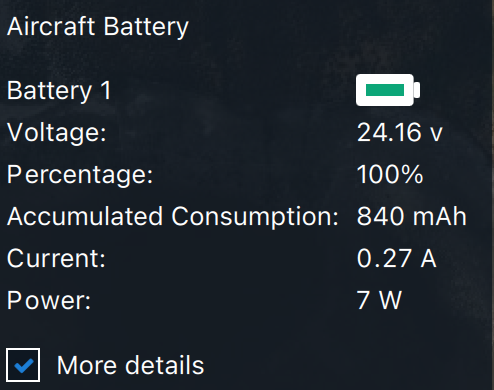
| ![](/files/wshdkbUEBnnZjKqtlWrR)                                                                 | **Battery Status**                                                                                                                    | Battery capacity remaining (percentage). For multiple batteries, the capacity of the battery that has the lowest percentage.<img src="/files/LUjW2YxsUNEQ83bD6ZsG" alt="" data-size="original">      |

---

# Agent Instructions: Querying This Documentation

If you need additional information that is not directly available in this page, you can query the documentation dynamically by asking a question.

Perform an HTTP GET request on the current page URL with the `ask` query parameter:

```
GET https://docs.auterion.com/vehicle-operation/auterion-mission-control/ui-breakdown/fly/high-level-status.md?ask=<question>
```

The question should be specific, self-contained, and written in natural language.
The response will contain a direct answer to the question and relevant excerpts and sources from the documentation.

Use this mechanism when the answer is not explicitly present in the current page, you need clarification or additional context, or you want to retrieve related documentation sections.